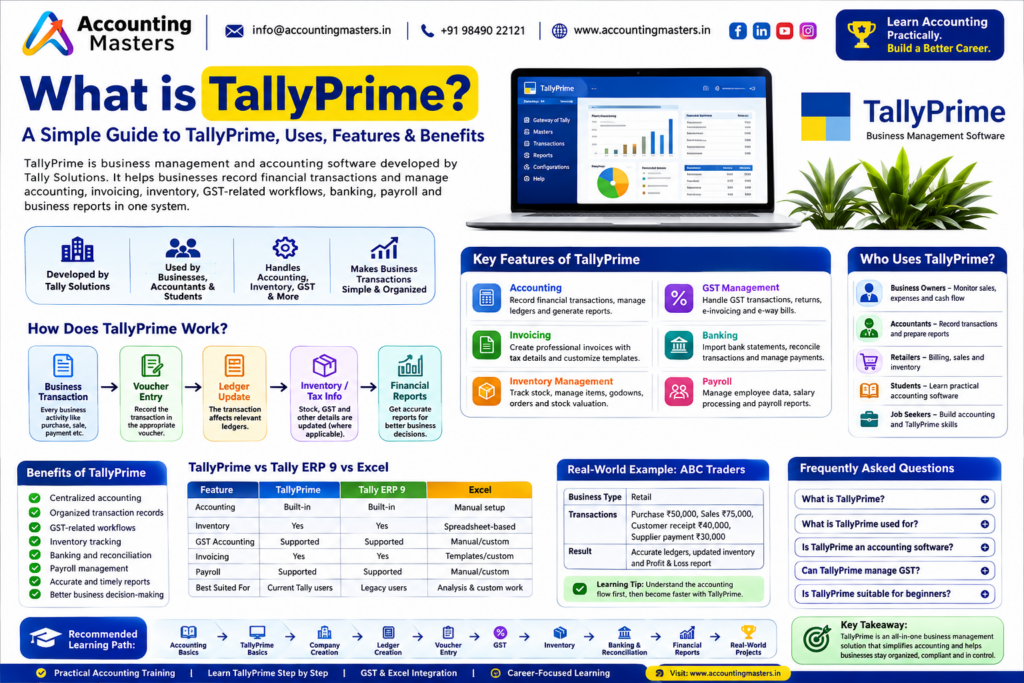
TallyPrime is business management and accounting software from Tally Solutions. It helps businesses record transactions and manage accounting, invoicing, inventory, GST-related workflows, banking, payroll and reports — all in one system.

What is Tally prime

What Is Tally Prime in Simple Words?

TallyPrime is software that helps a business record, organize and understand its financial and operational transactions.

For example, a business can use it to record:

Purchase → Sale → Payment → Receipt → Inventory → GST-related information → Financial Reports

Instead of maintaining every business record separately, TallyPrime connects related transactions so users can view accounting and business information through reports. It combines accounting with business-management functions such as invoicing, inventory, banking, compliance-related workflows and reporting.

Quick note: TallyPrime features and releases change over time. This guide focuses on its core purpose — always check version-specific features against the latest Tally documentation.

Snapshot

TallyPrime at a Glance

What is TallyPrime?Accounting and business management software
Developed byTally Solutions
Main purposeRecording and managing business transactions
Accounting / Invoicing / InventoryYes
GST-related workflows / Banking / PayrollYes
Business reportsYes
Suitable for beginners?Yes, with basic accounting knowledge
Common usersBusinesses, accountants, finance teams, students and job seekers

What Is Tally Prime Used For?

Recording sales / Recording purchases / Creating invoices / Maintaining ledgers / Payments & receipts / Customer/supplier management / Inventory tracking / Receivables & payables / GST transactions  Bank reconciliation / Payroll / Financial reports

Who Uses TallyPrime?

Business Owners

Monitor sales, expenses, cash flow and reports.

Accountants

Record transactions and prepare reports.

Retailers & Traders

Billing, sales, stock and accounting.

Service Businesses

Invoicing, accounting and receivables.

Students & Job Seekers

Build practical accounting software skills.

Finance Teams

Accounting, reporting and financial operations.

How Does TallyPrime Work?

The easiest way to understand TallyPrime is to follow the journey of a business transaction.

Business Transaction → Voucher Entry → Ledger Update → Inventory/Tax Information → Financial Reports

Example

Suppose a retailer purchases goods from a supplier. Depending on the setup and transaction, recording this purchase can affect purchase records, the supplier balance, inventory, applicable GST information, payables and financial reports.

This is why learning accounting fundamentals matters before trying to memorize TallyPrime commands.

What Are the Main Areas of TallyPrime?

AreaWhat It Helps With
AccountingRecording financial transactions
InvoicingCreating sales invoices
InventoryManaging stock and stock movements
GSTSupporting GST-related accounting workflows
BankingBank transactions and reconciliation
PayrollEmployee and salary-related processes
Receivables / PayablesTracking money owed by and to the business
ReportingUnderstanding financial and business information

TallyPrime for Accounting

Accounting is one of the main purposes of TallyPrime. Businesses can record sales, purchases, payments, receipts, contra transactions, journal entries, debit notes and credit notes.

Common Accounting Reports

Ledger, Day Book, Trial Balance, Profit and Loss Account, Balance Sheet, Cash Flow, Receivables and Payables.

Transaction → Voucher → Ledger → Trial Balance → Financial Statements

This flow matters for beginners because TallyPrime is not simply about entering numbers — the user needs to understand what the transaction means and which accounts it affects.

Tallyprime for Accountant

Ledgers and Vouchers in TallyPrime

What Is a Ledger?

A ledger is an account used to record transactions related to a particular account or party — for example Cash, Bank, Sales, Purchases, Rent, Electricity, or a specific customer or supplier account.

What Is a Voucher?

A voucher is used to record a business transaction in TallyPrime.

VoucherPurpose
SalesRecords sales
PurchaseRecords purchases
PaymentRecords payments
ReceiptRecords money received
ContraRecords certain cash/bank transfers
JournalRecords adjustment entries
Debit / Credit NoteRecords applicable debit/credit-note transactions

TallyPrime and GST

TallyPrime supports GST-related accounting and compliance workflows for applicable businesses, including GSTIN, CGST, SGST, IGST, HSN, SAC, GST invoices, GST reports, e-invoicing and e-way bills.

Business Transaction → Taxable Value → Applicable Tax → Invoice → Accounting Record → GST Reporting
Important: Software support does not replace professional tax advice. Always verify applicable GST rules before filing returns or making compliance decisions.
TallyPrime for Inventory Management

Businesses that sell or store physical products can manage stock items, stock groups, stock categories, units of measurement, godowns, purchase and sales orders, stock movements, valuation and batch information.

Simple Inventory Example

A retailer purchases 100 units and sells 30 units.

100 − 30 = 70 units remaining
TallyPrime for Invoicing

An invoice may contain customer details, product/service details, quantity, rate, discount, tax information, total amount and payment information.

Customer Order → Invoice → Accounting Entry → Receivable → Payment
TallyPrime for Banking

TallyPrime can support bank payments, bank receipts, bank transactions, bank reconciliation and connected banking where supported.

What Is Bank Reconciliation?

Comparing the transactions recorded in the books with the transactions shown in the bank statement.

Books → Compare With Bank Statement → Find Differences → Reconcile

TallyPrime for Payroll

Businesses with employees can use TallyPrime for employee information, salary details, attendance, payroll calculations and salary-related reports.

TallyPrime Business Reports

Sales reports, purchase reports, ledger reports, Trial Balance, Profit and Loss, Balance Sheet, Cash Flow, Receivables, Payables and inventory reports — turning transaction data into understandable business information.

Important TallyPrime Terms for Beginners

TermSimple Meaning
CompanyBusiness data maintained in TallyPrime
LedgerAccount used to record transactions
VoucherEntry used to record a transaction
GroupCategory used to organise accounts or items
Stock Item / GroupProduct maintained in inventory, and its category
GodownLocation where stock is stored
UnitMeasurement used for stock quantity
GSTIN / HSN / SACGST registration number; classification codes for goods and services
Trial BalanceStatement of account balances
Profit & LossReport showing income, expenses and profit/loss
Balance SheetStatement of assets, liabilities and capital

TallyPrime Practical Example: ABC Traders

Business: ABC Traders  ·  Type: Retail business

TransactionAmountAccounting Area
Business capital₹2,00,000Capital
Goods purchased₹50,000Purchase
Goods sold₹75,000Sales
Customer payment received₹40,000Receipt
Supplier payment made₹30,000Payment
Business expenses₹10,000Expenses
Vouchers → Ledgers → Inventory → Receivables/Payables → Reports

The important lesson: each transaction should be recorded correctly. A software system can process the information, but accurate accounting depends on correct setup and data entry.

TallyPrime vs Tally ERP 9 vs Excel

AreaTallyPrimeTally ERP 9Excel
Primary purposeAccounting & business managementOlder Tally business management softwareSpreadsheet/data analysis
Accounting / LedgersBuilt-inBuilt-inManual setup
Voucher-based accountingYesYesNot specialized
Inventory / InvoicingYesYesSpreadsheet/templates
Financial reportsBuilt-inBuilt-inFormula/pivot based
Learning focus todayRecommended for new learnersMainly legacy usersUseful complementary skill

Which Should a Beginner Learn?

If you’re starting your Tally journey now, TallyPrime should generally be your primary Tally product to learn. Excel remains highly useful for accounting analysis, data handling and reporting.

TallyPrime + Accounting + GST + Excel

Is TallyPrime Easy to Learn, and Where Does It Lead?

TallyPrime can be easy to learn when you understand basic accounting concepts and practice real transactions. Don’t start by memorising every shortcut — first understand:

What happened? → Which account is affected? → Which voucher should be used? → What changes in the ledger? → What appears in the report?

Learning Levels

LevelFocus
BeginnerInterface and company creation
BasicLedgers and vouchers
IntermediateGST and inventory
AdvancedBanking, payroll and reporting
PracticalReal-world accounting projects

Useful for Accounting Jobs

Accounts ExecutiveJunior AccountantAccountantAccounts AssistantBilling ExecutiveFinance AssistantGST Executive

Learning TallyPrime alone does not guarantee employment. A stronger profile combines TallyPrime + Accounting Fundamentals + GST + Excel + Practical Experience.

TallyPrime and Current Version Updates

TallyPrime continues to receive product updates, so version-specific features should not be treated as permanent. As of 2026, Tally’s official information highlights TallyPrime 7.1, which includes personalised invoice templates, enhanced IMS reconciliation, Schedule III financial statements, ICICI Bank payments, secure OAuth-based email and updated e-TDS/e-TCS returns, among other accounting and GST improvements.

Tally also currently promotes Docs by Ira, an AI-powered document-processing capability designed to convert invoice information into accounting-ready entries and reduce manual processing.

Important: This article explains the meaning and purpose of TallyPrime. For release-specific detail, refer to a dedicated version page or Tally’s official documentation.

Meet Your Trainer & Reviewer


Mr. Varun Kumar

Lead Trainer · Accounting Masters

Mr. Varun Kumar brings 18+ years of experience in accounting, taxation and TallyPrime training, and leads the Tally batches at Accounting Masters’ KPHB Colony centre in Kukatpally, Hyderabad.

He reviewed this guide to ensure the explanations of ledgers, vouchers, GST and inventory workflows reflect how TallyPrime is actually used in day-to-day accounting practice.

Frequently Asked Questions About TallyPrime

What is TallyPrime used for?

Recording business transactions, accounting, invoicing, inventory management, GST-related workflows, banking, payroll, receivables, payables and financial reporting.

Is TallyPrime suitable for beginners?

Yes. Beginners can learn TallyPrime step by step, and basic accounting knowledge makes the process easier.

Can TallyPrime manage GST and inventory?

Yes. TallyPrime supports GST-related accounting and compliance workflows, along with stock items, stock movements, orders and inventory reporting.

Should I learn TallyPrime or Tally ERP 9?

If you’re beginning your Tally learning journey today, TallyPrime should generally be your primary focus. Tally ERP 9 remains relevant mainly for legacy systems.

Is TallyPrime worth learning?

It can be valuable for accounting and finance-related work, especially when combined with accounting fundamentals, GST, Excel and practical experience.


Scroll to Top